Wing Design Calculator
How to activate movable controls in XFLR5:
- Open the downloaded XML in XFLR5 (F5 > Plane > Import XML).
- Double-click the Elevator. Check "Flap" for Section 1. Set Hinge (x/c) to .
- Double-click the Fin. To draw a straight vertical hinge line:
- Section 1 (Root): Leave unchecked (Elevator Clearance)
- Section 2 (Cut Vertex): Check "Flap", set x/c to
- Section 3 (Tip): Check "Flap", set x/c to
- Double-click the Main Wing. Pre-sliced. Check "Flap" on sections and set Hinge (x/c) to 0.750.
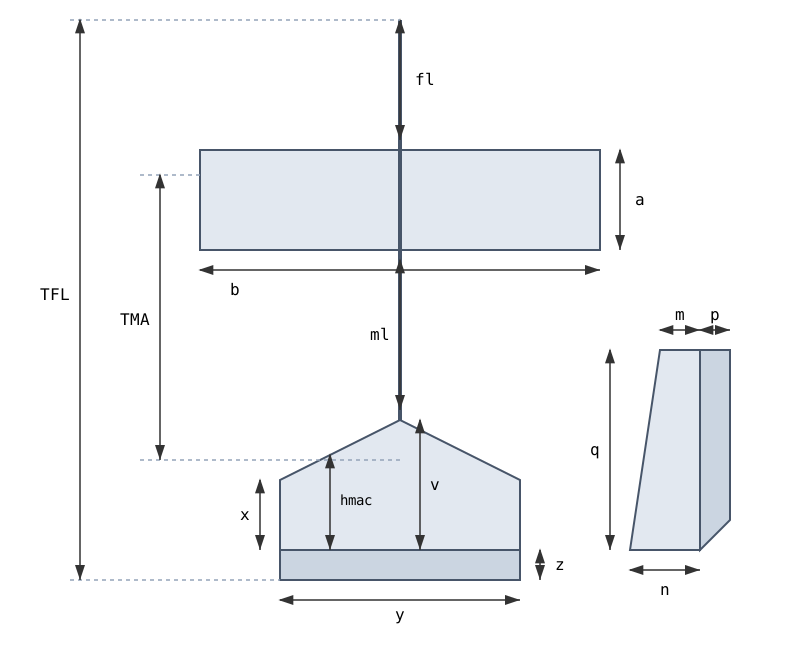
Reference Picture for Dimensions
Parameter Definitions:
- a: Main Wing Chord (Width of the main wing)
- b: Main Wing Span (Total length from tip to tip)
- fl: Front Length (Nose tip to main wing leading edge)
- ml: Middle Length (Main wing trailing edge to horizontal tail leading edge)
- TMA: Tail Moment Arm (Distance from main wing CG to horizontal tail CG)
- TFL: Total Fuselage Length (Nose tip to elevator trailing edge)
- y: Horizontal Tail Span (Total width of horizontal stabilizer)
- v: HT Root Chord (Fixed horizontal stabilizer center length)
- x: HT Tip Chord (Fixed horizontal stabilizer outer tip length)
- hmac: HT Mean Aerodynamic Chord (Average chord length)
- z: Elevator Chord (Movable elevator width)
- n: Vertical Tail Root Chord (Fixed vertical fin base length)
- m: Vertical Tail Tip Chord (Fixed vertical fin top length)
- q: Vertical Tail Height (Total vertical fin height)
- p: Rudder Chord (Movable rudder width)